
MAAD-AF eDiscovery Exfil
This module allows attackers to exploit the immense capabilities of the Microsoft eDiscovery service to find and exfiltrate data from an environment. This module has several sub-modules giving attacker granular control over its actions such as ability to escalate privileges, exfiltrate data from new or existing eDiscovery cases created within an environment, and much more.
Module Overview - DRAFT
NOTE TO ENABLEMENT TEAM: We may need to find a more sustainable example to use for lab users and adjust the verbiage below accordingly.
From the main Attack Arsenal menu, enter
10forFind and Exfiltrate Data with eDiscovery. Read through the MITRE information, and press<Enter>to continue.Note that this module initializes by attempting access to the Microsoft Compliance Portal leveraging the credentials cached within MAAD-AF.
Once a successful connection has been established, MAAD-AF will display a list of submodules.
Use the sub-module
2: Create a new eDiscovery Search, and enterYesto perform recon for available teams to join.Follow the on-screen prompts to create a new eDiscovery case.
Enter
1for a New Case.Provide a name for the case. Use the eDsicvoery case name provided for the lab. Note that a real attacker may choose to use a very ambiguous sounding name here to avoid standing out to other compliance admins.
Provide a name for the search, again using the eDiscovery search name provided by the lab.
Enter search terms that eDiscovery will use to discover relevant data. Attackers will think critically here, tailoring their search to be relevant for the information they are looking for, such as
patent,confidential,token,password, etc.For the purposes of the lab, use the keywords
vectra labs.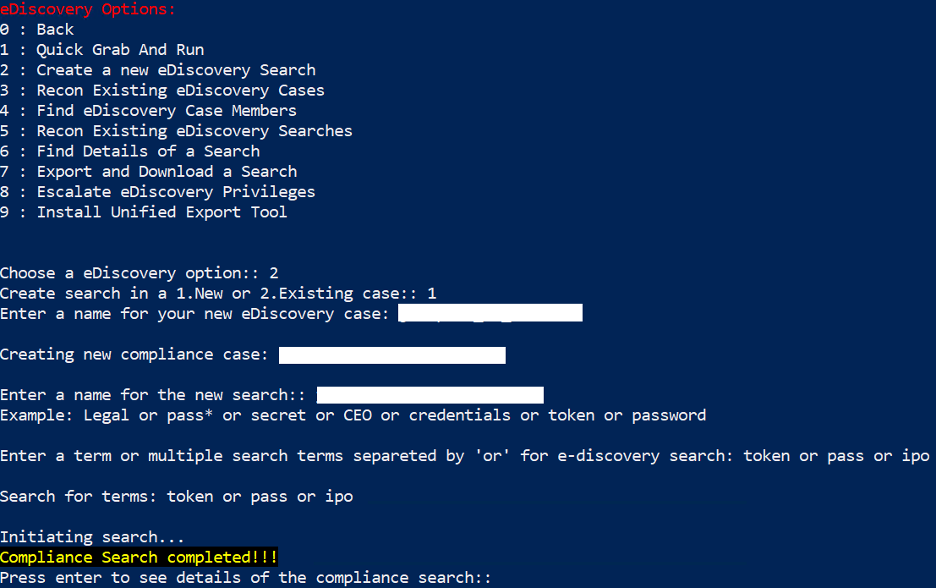
Feel free to discovery other sub-modules. Many actions within eDiscovery require the user to be an eDiscovery Admin, so leveraging other MAAD-AF modules to escalate privileges would be advantageous.
MAAD-AF will prompt the user to undo the actions just created. Select
Nofor the purposes of this exercise.
Validation
Enter the exact name of the created search.