
MAAD-AF Azure AD Recon
This module will cover the first module in the MAAD-AF Attack Arsenal,
Recon Connected AzureAD Environment. This module allows an attacker to
perform some basic recon on the environment they are connected to. Some of this
information can be used by an attacker to launch future attacks.
The Recon Connected AzureAD Environment Attack Arsenal module has several sub-
modules which allow for collecting different types of information based on the
compromised account’s access and privilege level.
Module Overview
From the main Attack Arsenal menu, enter
1forRecon Connected AD environment. This will present the attacker with a manue of sub-modules, as shown below.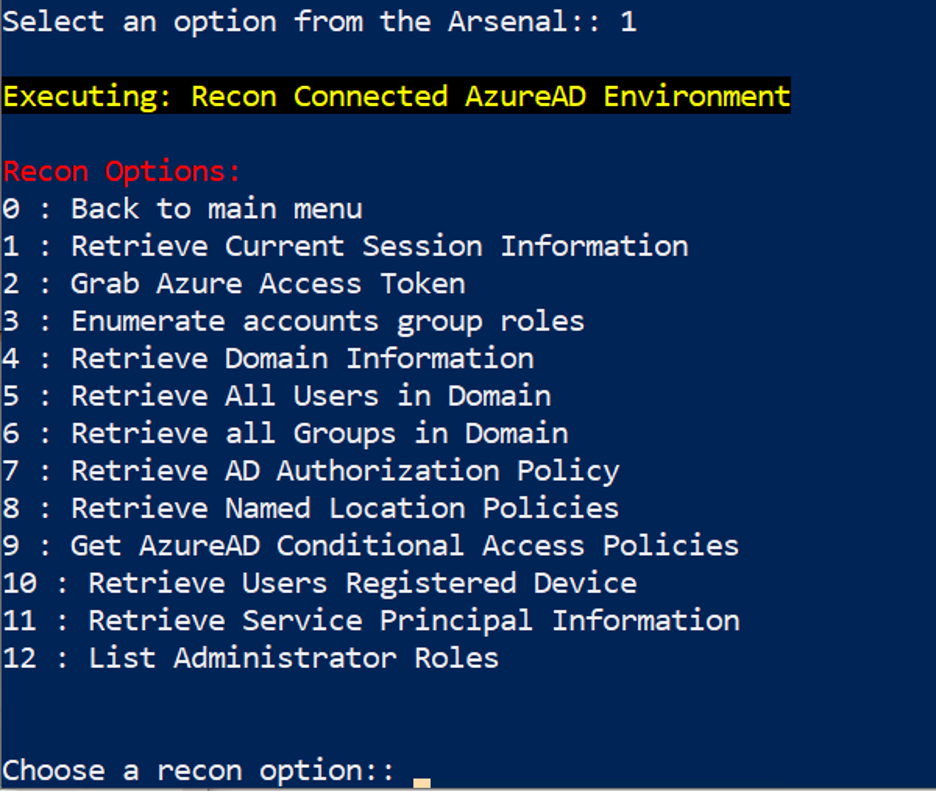
From the new menu, select option
1: Retrieve Current Session Information.This will return information about the current session, such as the account, tenant information, etc.

Explore other recon options from the menu. Note the types of information they produce based on the compromised account’s access level.
Once done exploring, enter
0to return to the main MAAD-AF Attack Arsenal menu.
Validation
Note the tenant ID from the output of 1: Retrieve Current Session Information.