
MAAD-AF Redundant Access Creation
This module allows an attacker to create a backdoor account in the environment with the same privileges as the initially compromised account. This ensures that the attacker does not lose any access or privilege. An attacker may choose to create a backdoor account to:
Maintain secondary access in case the initially compromised account gets locked down, or
Carry out malicious actions using the backdoor account to avoid raising alarm on the initially compromised account.
Module Overview - DRAFT
NOTE TO ENABLEMENT TEAM: We need to figure out where/how a user of this lab would be creating accounts. Tenant, account name format, etc.
From the main MAAD-AF Attack Arsenal menu, select
2forCreate Backdoor account for redundant access.MAAD-AF provides MITRE information of the attack techniques employed in each module. Read through the information and hit
<Enter>to continue.Follow the prompts within the module in order to set up the backdoor account:
Enter the full username, including the domain, of the backdoor account to be created. Note that a list of available domains will be displayed to choose from.
Enter the password for the backdoor account to be created. Note that the password must be compliant with existing tenant password policy. Since an attacker may or may not know what that is, a long password can be used, or the same password from the initial compromised account (since by nature it would be compliant.)
Finally, enter a display name for the backdoor account, e.g., John Smith.
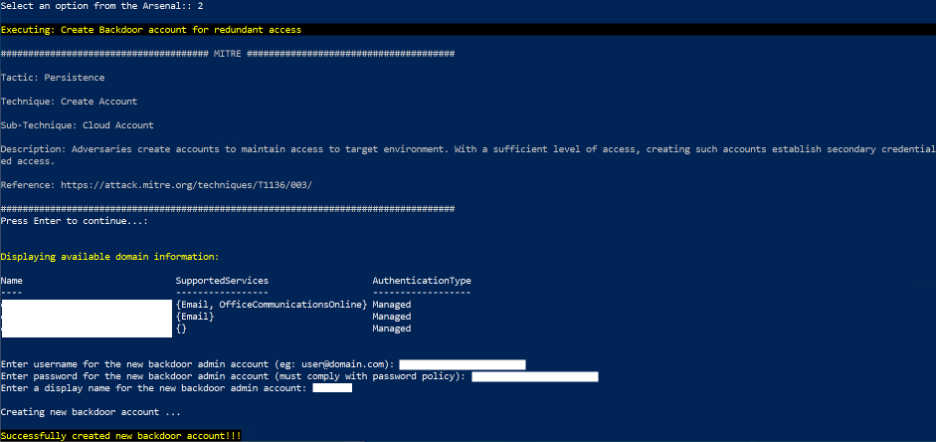
MAAD-AF will attempt to create the new account using the privileges from the initially compromised account. Additionally, MAAD-AF will attempt to give the new account Global Admin privileges.
Once the account is successfully created, MAAD-AF will prompt the attacker to use the new backdoor account for future actions.
For the purposes of this lab, select
No. However, during a real exercise, an attacker may choose to answerYes, after which MAAD-AF would terminate all current connections and re-establish its access using the new backdoor account.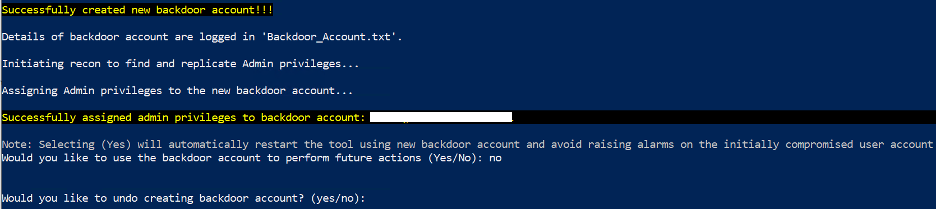
MAAD-AF will prompt the user to undo the actions just created. Select
Nofor the purposes of this exercise.
Validation
Note the display name of the backdoor account which was just created.